
Inside Smart Shopping Mode only
Luuna sees the cart, checkout and order confirmation inside Smart Shopping Mode. Never your browsing history, searches or store-account details.
Luuna keeps your weekly budget on screen while you shop on your iPhone. At checkout, it shows you where the order leaves you, before you pay.
The first 1,000 people to download Luuna and sign in get a discount for life.
NUMBER people have signed in to the beta so far.
Give each store you shop a weekly number. Luuna keeps what's left of it at the top of every page and checks every order against it before you pay. There's nothing to log, so it doesn't fall apart in week three like the budget apps you quit.
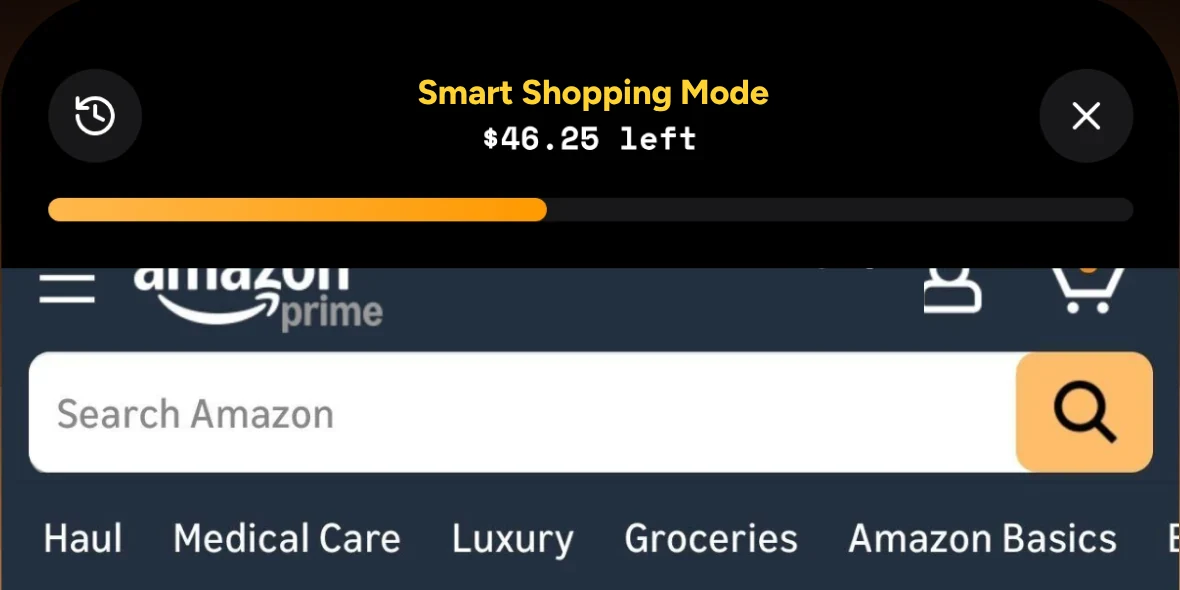
 Step 1 of 4
Start with the ones you spend the most in, say $45 a week at Amazon and $30 at Walmart.
Step 2 of 4
Open the store from Luuna or its home-screen widget. What's left for the week stays pinned to the top while you browse.
Step 3 of 4
At checkout Luuna shows the order total, what you have left and where you'd land. Then you choose to wait on it or carry on.
Step 4 of 4
Money you didn't spend shows up on your Home screen, and each week under budget adds to your streak.
That's what your one-tap orders add up to in a year. Keep just one in four and that's $1,248 toward a trip.
The math runs in your browser and nothing is sent anywhere. An estimate from the numbers you entered, not a promise of savings.
Pick someone you trust. After they text back YES, Luuna lets them know when you're close to your weekly budget, and you can ask them to approve a purchase that goes over.
Get early accessLuuna never texts anyone who hasn't said yes, and partners can reply STOP anytime. How partner texts work
Tap the budget pill on any page and Luuna gives you a quick, honest read on what you're looking at. The rest of the app follows the same lead.
This is the third pair of headphones you've looked at tonight. Maybe sleep on it before adding this one.
Your week with LuunaYou kept $58.65 this week and stayed under budget in 3 of 4 stores.
Tap the budget pill on any page for a quick read on what you're looking at.
Lock the shopping apps you open without thinking. Tap one and Luuna opens that store in Smart Shopping Mode instead, with your budget at the top. Core locks up to three apps, and Max locks as many as you like.
Every Sunday evening you get a short recap: what you kept and how many of your stores stayed under budget.
Connecting a bank is optional. It lets Luuna count what you spend outside the app, so your weekly numbers stay accurate.
Luuna won't block a store unless you ask it to. It puts the real number in front of you and then gets out of the way. If you still want the thing, buy it.
Get early accessOnly what it needs for your budget, and only inside Smart Shopping Mode.
Luuna sees the cart, checkout and order confirmation inside Smart Shopping Mode. Never your browsing history, searches or store-account details.
Connecting a bank lets Luuna count what you spend outside the app, so your weekly numbers stay accurate. Skip it and Luuna still works.
From a late-night cart to the end of the week: where Luuna shows up, and what you get back.
The store nudges you to finish the order.
Still thinking about it? Checkout takes one tap.
At checkout, before you pay. You make the call.
Hold on. This order puts you 40% over your $100 Amazon budget this week.
Holding back counts, and Luuna keeps track.
Three weeks in a row under budget.
Someone you trust can approve a purchase by text.
Said yes to one purchase. Go ahead.
See what you kept by staying under budget.
You kept $58.65 this week.
Every store's budget starts over.
New week, new budget: $100 for Amazon.

OUTCOME QUOTE IN THEIR WORDSFIRST NAME · CONTEXT (e.g. grad student, DoorDash regular)
Every budgeting tool we tried showed up afterward with a chart. A budget like that is an autopsy. So we built Luuna for the moment before you pay.
Every feature in the app is open to you while we test it together. The people in this first beta will shape what Luuna becomes.
Get early accessThe first 1,000 people who download Luuna on TestFlight and sign in become Founding Members and keep a discount on Luuna for life once it opens on the App Store.
Claim a spotGet the beta on your iPhone in two taps. The first 1,000 people to download Luuna and sign in get a discount for life.
Get early accessSomething else on your mind? Email info@tryluuna.com.
Only what it needs for your budget: the cart, checkout and order confirmation inside Smart Shopping Mode. Never your browsing history, searches or store-account details. Privacy policy
Only if you turn that on. By default Luuna shows you the number at checkout and you decide.
No. Connecting a bank is optional. It lets Luuna count what you spend outside the app, so your weekly numbers stay accurate.
Amazon, Walmart, Target, Uber Eats and DoorDash.
That's it: no invite to wait for. If the current group is full, leave your email and you're first in when the next one opens.
It's a beta, so you'll hit rough edges. We change the app every week, and every change is on the changelog with its date. Found something broken? Take a screenshot and share it with TestFlight's feedback, or email info@tryluuna.com.
We haven't set an end date yet. Luuna is free for as long as you're in the beta. We'll post the price here before Luuna opens on the App Store, and Founding Members, the first 1,000 people to download Luuna and sign in, keep a discount on it for life.
If you want to plan every dollar of the month, track bills across all your accounts or look back at charts of where your money went, a full budgeting app like YNAB does that better. Luuna is for the order in front of you, in the few stores where one-tap orders add up. It's iPhone only for now. How Luuna compares
Not yet. Luuna is iPhone only for now.