
Best Budget Free App: Honest Guide for iPhone Shoppers
The best budget free app for you depends on what breaks first: friction at checkout, auto-categorizing, a budget you share with a partner, or rollover. This guide walks through each one honestly, using what people say on Reddit and MacRumors, including where our own app, Luuna, falls short today and what we're building next.
Disclosure: Luuna is our app. We say plainly what it does today, what it doesn't, and what's on our roadmap.
Which free budget app is best for families sharing a household budget?
For a household, the question isn't which app syncs across two iPhones. It's whether both of you see the number at the moment one of you is about to buy something. Free tiers and sharing rules change often, so check what an app's free plan includes before you commit.
What breaks when two people share one budget app
Most apps sync one account, not one budget between two people. You end up texting each other receipts, or one partner does all the entry while the other orders DoorDash blind.
What actually works for two people
The setup that works is a budget both partners can see at checkout, not a report one of you reads later. Sharing a tracker helps you agree on where the money went, but it still shows the purchase after the fact: the same failure many people remember from Mint.
Here's where Luuna is today. Each person sets their own weekly number for each store, so it works for couples who each want their own limits. On Max, you can add an accountability partner: someone you trust gets a text when you're close to your budget and can OK a purchase. What Luuna doesn't have is one shared household budget, and it's iPhone only, so it doesn't fit couples on mixed phones.
Do any free budget apps support rollover budgets for unused funds?
Rollover in a truly free app is rare. Where it exists, it's usually part of a paid plan, so check whether it's in an app's free tier before you set anything up.
How rollover works in envelope-style apps
Envelope apps split your budget into categories. Anything unspent moves to next period's envelope instead of vanishing. That matters if your spending is lumpy: groceries one week, DoorDash the next. Manual-entry apps can imitate this, but only if you log every order, which is exactly where most people quit.
When rollover matters (and when it just hides overspending)
Rollover suits people with steady income and uneven weeks. If you usually underspend, it rewards you. If you usually overspend, rollover becomes a ledger of money you owe your future self, and the hole grows while the budget looks intact.
Put Luuna through the same test: today it doesn't roll unused budget forward. Each store's weekly number starts fresh every week, and what you didn't spend shows up as money kept. Weekly budgets that adjust on their own, including rollover and catch-up, are on our roadmap.
Which free budget apps use AI to auto-categorize spending, and how well does it work?
Auto-categorization vs manual entry
Most free apps that promise auto-categorization need a bank connection, then guess at the merchant after the charge clears. If your problem is the one-tap DoorDash order, a label that appears a day later changes nothing. Manual-entry apps flip it: you log the purchase yourself, which is friction, and it still happens after you've paid. Luuna does a different job: it reads the cart and the order total in the store itself and puts the real number in front of you at checkout, instead of sorting what you already bought.
Where AI categorization still gets it wrong
Auto-categorization often mislabels split orders, several subscriptions bundled into one charge, and merchants with a generic name on the statement. You end up fixing categories by hand, which defeats the promise. A clear limit you set yourself, for the stores where you actually overspend, beats a mislabeled chart.
What do Reddit users say are the most trustworthy free budget apps?
The churn pattern: why people quit Mint and YNAB
The recurring complaint in budgeting threads is timing, not features. People describe trying app after app and quitting because each one reports where their money went after the fact. A MacRumors thread puts it plainly: “They are only any use at showing you what you've spent after you've spent it.” The same thread shows the churn in action, with one reader narrowing “the search down to a possible 4 applications” and still not committing. Even well-liked tools get dropped when the logging habit costs more than it pays back.
What forum users say about abandoned betas and dead apps
Trust signals in these threads are blunt. People judge an app by whether it's still being worked on, and they punish anything that stalls. In a MacRumors thread about Cha-Ching, one reader asks about “very negative reviews about the beta version,” and another answers: “Given that its been in beta for what one year, two years? I'd say that its not an actively developed application.”
The takeaway: pick apps that ship updates, and check the changelog before you put in weeks of setup. Ours is at tryluuna.com/changelog, and we update the beta every week.
What features do free budget apps typically paywall, and is upgrading worth it?
Common paywalls in free tiers
Free tiers usually hold back the same three things: automatic bank sync, sharing with another person, and rollover of unused money. Basic tracking tends to stay free. And if an app has sat “in beta for what one year, two years,” as one MacRumors poster put it about Cha-Ching, treat its free tier as temporary rather than a promise.
When the paid tier earns its price
Pay when the locked feature is the one you'd use daily: bank sync if you won't log purchases by hand, a partner if you want someone in your corner. For Luuna: it's free while it's in beta, with Core and Max plans planned for launch, and accountability partners come with Max. The first 1,000 people to download Luuna and sign in become Founding Members and keep a discount for life.
How do free budget apps compare on bank syncing and data privacy?
Bank sync: convenient until it breaks
Sync pulls every order from Amazon, DoorDash and Uber Eats into the app without you touching it. The trade-off: you hand over your bank login or a token, and when a connection breaks mid-month, transactions go missing and your budget looks healthier than it is. Most of the big budgeting apps lean on bank connections.
Manual entry: more friction, more control
Manual entry means no login shared with anyone and nothing silently missing. The cost is typing in every one-tap order yourself, which is where most people give up.
| Compared on | Bank sync | Manual entry |
|---|---|---|
| Privacy | Login or token shared | Nothing shared |
| Reliability | Breaks when the connection does | Works until you stop logging |
| Effort | Near zero | One entry per order |
Luuna sits between the two. It reads the cart and the order total inside its Smart Shopping Mode, so purchases in the stores it supports count without importing or typing anything. Connecting a bank is optional and lets it count what you spend outside the app. Without that connection, it only sees purchases made in Smart Shopping Mode today. Two builds on our roadmap aim to close that gap: counting Apple Pay taps in stores, and reading order-confirmation emails for orders placed elsewhere.
Which free budgeting app works best without linking a bank account?
If you won't link a bank, you either log purchases yourself or use an app that sees them some other way. Readers on MacRumors describe trying four or five apps and finding most of them useful only after the fact, which is the problem manual entry either fixes or makes worse. Apps built around importing and syncing turn into data entry the moment you skip the connection.
How Luuna works without a bank
Luuna doesn't need a bank to work. Open a store in its Smart Shopping Mode, and it reads the cart and the order total as you shop, so the orders you place there count toward your weekly number with nothing to type. It’s built for people whose spending happens in a few favorite stores.
The trade-off nobody mentions: you become the tracker
Without a bank feed, every purchase has to be caught somewhere, or the number goes stale. Luuna has the same limit today: if you shop outside Smart Shopping Mode and haven't connected a bank, it doesn't see the purchase, and your weekly number is off. That's why Apple Pay taps and order-confirmation emails are on our roadmap. Every app has this gap; bank sync just hides it.
Best budget free app for stopping the one-tap order: what actually works in the 10 seconds before checkout?
After-the-fact charts vs pre-purchase friction
Most budgeting apps work on the same timing: they show you where your money went after the fact. That's useful for a weekly review and useless for the 10 seconds before a one-tap DoorDash order goes through. The impulse buy is decided and paid for before any chart opens.
Where Luuna fits, and where it falls short today
Luuna (this site's own app, iPhone only) flips the timing. It keeps your weekly number for each store on screen while you shop in its Smart Shopping Mode, and at checkout it shows where the order leaves you, before you pay. You always make the final call. Streaks keep the habit going between orders, and on Max an accountability partner can get a text when you're close to your budget.
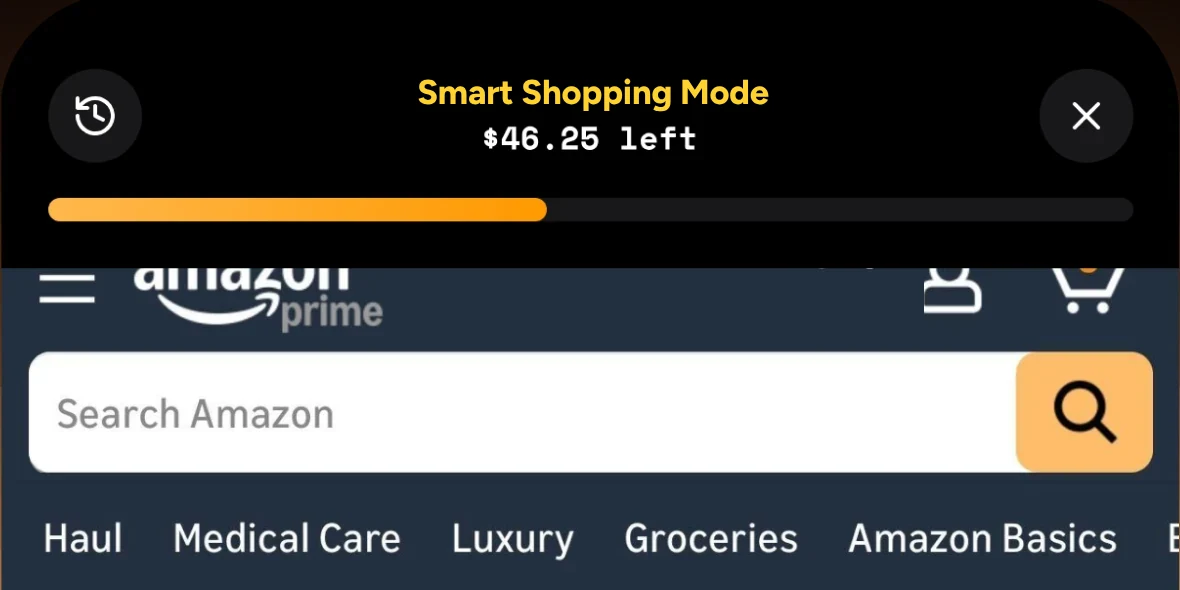
By the same criteria this guide applies to every app, here's what Luuna doesn't do yet, and what's coming:
- Purchases outside Smart Shopping Mode only count if you connect a bank. On the roadmap: Apple Pay taps in stores and order-confirmation emails.
- No rollover. On the roadmap: weekly budgets that adjust on their own, including rollover and catch-up.
- Subscriptions and bills aren't covered. On the roadmap: return-window reminders, forgotten recurring charges, and buy now, pay later installments counted against your budget.
- No shared household budget, and iPhone only. Each person keeps their own weekly numbers.
If your problem is the one-tap order, timing beats features.
FAQ
Is there a truly free budget app with no subscription?
Luuna is free while it's in beta, with Core and Max plans planned for launch, and the first 1,000 people who sign in become Founding Members with a discount for life. Elsewhere, free tiers usually cover basic tracking and hold back bank sync, sharing and rollover for paid plans. Check what a free plan includes before you put in the setup work.
Can my partner and I share a budget app for free on iPhone?
Luuna doesn't have a shared household budget today: each person sets their own weekly numbers. On Max, an accountability partner gets a text when you're close to your budget and can OK a purchase. In general, sharing is one of the features apps most often charge for, and a shared tracker still shows where money went after the fact.
What happened to Mint, and what should I use instead?
Intuit shut Mint down in 2024. If Mint's after-the-fact charts were the problem, look for an app that steps in before you pay, not one that draws a better chart afterward. That's the job Luuna is built for: your weekly number for each store at checkout, before the order goes through.
Do free budget apps sell my bank data?
Read each app's privacy policy; practices differ, and this guide doesn't speak for any other app. In general, bank-sync apps need your login or a token to pull transactions, which is a real privacy trade-off, while manual-entry apps share nothing because there's no connection. Luuna's own policy is at tryluuna.com/privacy.
What is the best free budget app for impulse shoppers?
For the 10 seconds before a one-tap order, you want an app that works before checkout, not after. Luuna does that inside its Smart Shopping Mode: it shows your remaining weekly number for the store at checkout, before you pay. It's iPhone only and free while it's in beta. Trackers report the purchase after the charge goes through.
Try Luuna free while it's in beta. Give the stores you shop a weekly budget and see where each order leaves you before you pay.
Get early access